Stage Request States
A stage request can be in one of several states. In addition to the Request status property on the details page of a request, the state of a request is also reflected in the Status badge on the overview page:

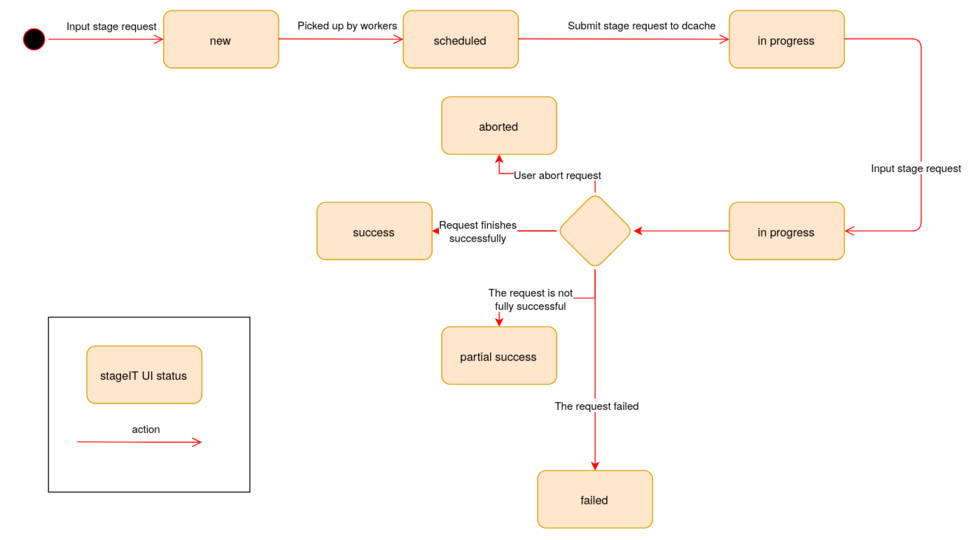
The following state diagram depicts how a stage request transitions from one state to another:
What do the states mean?
- new: the request has been submitted to StageIT, but has not yet been picked up for processing
- scheduded: the request has been picked up by StageIT for processing, but no processing has happened yet
- in progress: the request is currently being processed by StageIT
- success: the request has finished successfully, data has been staged and is ready for retrieval
- aborted: the request was aborted through the StageIT UI or API causing an abort request to be created, Pin for the request in question was removed.
- failed: an occurred during the request, please view the request details page for more information on the errors
- partial success: some files were staged successfully and some encountered an error, please view the request details page for more information on the errors. The succesfully staged surls are ready for retrieval.
If you encounter an error that you can not handle or explain, you may contact the SDC Helpdesk.